Bluetooth Mini Thin Keyboard Mouse Set
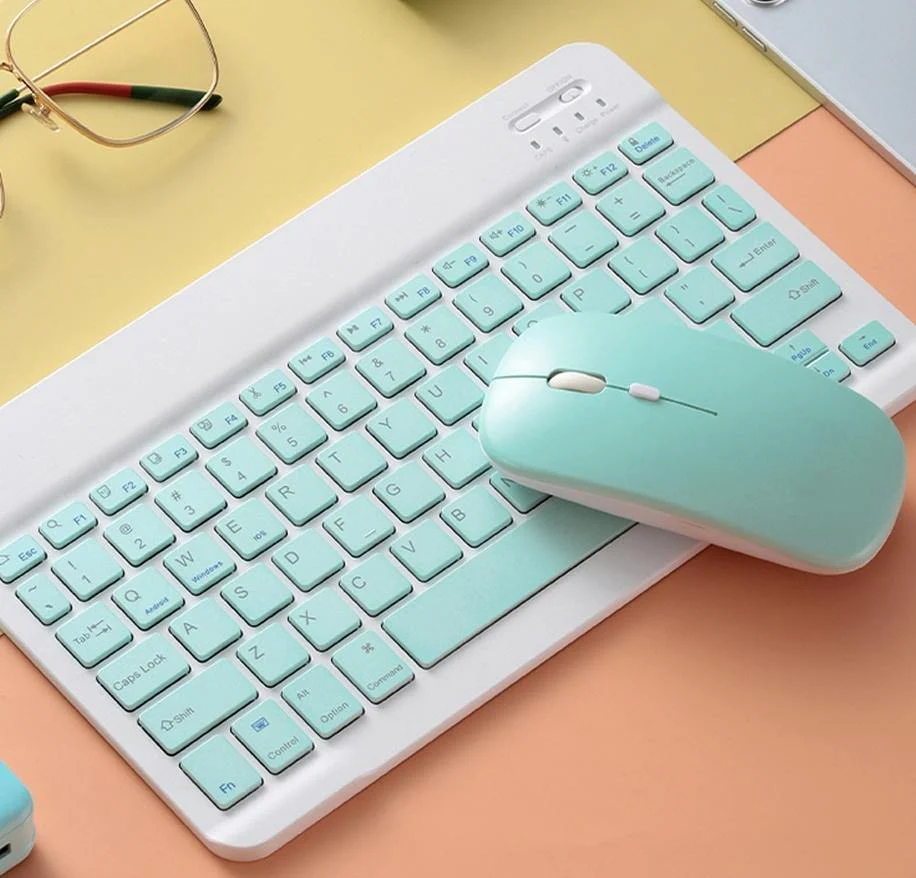
It's time to turn your table into a laptop with this Bluetooth mini keyboard and mouse! This is the perfect accessory for any business person on the go. Its lightweight, easy to carry, long battery life, and can be used on iOS, Android, and Windows devices.
- Long battery life, fast charging, and power saving.
- 1-hour charge, use 30 days(Based on 8 hours of daily use).

Wireless Keyboard With Touchpad
- This keyboard with touchpad, and it is a multi-touch navigation trackpad.
- Instead of the mouse controlling the direction, the touchpad can be easy to carry.

Bluetooth Keyboard and Mouse Combo
- Wireless Keyboard + 4.0 Bluetooth Dual Modes Mouse.
- Strong compatibility, suitable for iPads, Phones, Tablets, Laptops, etc.
- Such as for iPad Air 4th, for iPad 10.2 (8th/ 7th Generation)/ 9.7, for iPad Pro 12.9/ 11, for iPad air 10.5, for iPad mini 5, Phone Pro/ SE, etc.
Fast Bluetooth Connection
1. Non-touch Keyboard:
a. Turn on the power light and click the connect (the Bluetooth indicator will flashes);
b. Open the Bluetooth of your iPad, choose the "Bluetooth Keyboard," and wait for it connects success;
c. Finally, switched to the corresponding system by pressing Fn+Q(Andriod)/ Fn+W(Windows)/ Fn+E( IOS).

2. Touchable Keyboard:
a. Slide the power switch from left to right;
b. Bluetooth pairing: Press the Fn+C (the Bluetooth indicator will flashes);
c. Open the Bluetooth settings for your iPad, and choose the "Bluetooth Keyboard";
d. Finally, switched to the corresponding system by pressing Fn+A(Andriod)/ Fn+S(Windows)/ Fn+D( IOS)

Basic key combinations:
- Switch apple system: FN+E
- Chinese and English input method switching: FN+Space
- Show physical keyboard: FN+Control
- Switch software: Conmmand+Tab
- Case switching: Capslock

(If the iPad cannot be set first: Set one + general+keyboard + physical keyboard +turn off the caps lock key to switch the Latin keyboard)
Specifications:
Interface: Bluetooth
Keyboard Connection: Wireless
Optical Resolution: 1600 DPI
Package Included:
Please see the images for reference.
It's time to turn your table into a laptop with this Bluetooth mini keyboard and mouse! This is the perfect accessory for any business person on the go. Its lightweight, easy to carry, long battery life, and can be used on iOS, Android, and Windows devices.
- Long battery life, fast charging, and power saving.
- 1-hour charge, use 30 days(Based on 8 hours of daily use).
Wireless Keyboard With Touchpad
- This keyboard with touchpad, and it is a multi-touch navigation trackpad.
- Instead of the mouse controlling the direction, the touchpad can be easy to carry.
Bluetooth Keyboard and Mouse Combo
- Wireless Keyboard + 4.0 Bluetooth Dual Modes Mouse.
- Strong compatibility, suitable for iPads, Phones, Tablets, Laptops, etc.
- Such as for iPad Air 4th, for iPad 10.2 (8th/ 7th Generation)/ 9.7, for iPad Pro 12.9/ 11, for iPad air 10.5, for iPad mini 5, Phone Pro/ SE, etc.
Fast Bluetooth Connection
1. Non-touch Keyboard:
a. Turn on the power light and click the connect (the Bluetooth indicator will flashes);
b. Open the Bluetooth of your iPad, choose the "Bluetooth Keyboard," and wait for it connects success;
c. Finally, switched to the corresponding system by pressing Fn+Q(Andriod)/ Fn+W(Windows)/ Fn+E( IOS).
2. Touchable Keyboard:
a. Slide the power switch from left to right;
b. Bluetooth pairing: Press the Fn+C (the Bluetooth indicator will flashes);
c. Open the Bluetooth settings for your iPad, and choose the "Bluetooth Keyboard";
d. Finally, switched to the corresponding system by pressing Fn+A(Andriod)/ Fn+S(Windows)/ Fn+D( IOS)
Basic key combinations:
- Switch apple system: FN+E
- Chinese and English input method switching: FN+Space
- Show physical keyboard: FN+Control
- Switch software: Conmmand+Tab
- Case switching: Capslock
(If the iPad cannot be set first: Set one + general+keyboard + physical keyboard +turn off the caps lock key to switch the Latin keyboard)
Specifications:
Interface: Bluetooth
Keyboard Connection: Wireless
Optical Resolution: 1600 DPI
Package Included:
Please see the images for reference.
Original: $45.95
-70%$45.95
$13.79Description
It's time to turn your table into a laptop with this Bluetooth mini keyboard and mouse! This is the perfect accessory for any business person on the go. Its lightweight, easy to carry, long battery life, and can be used on iOS, Android, and Windows devices.
- Long battery life, fast charging, and power saving.
- 1-hour charge, use 30 days(Based on 8 hours of daily use).
Wireless Keyboard With Touchpad
- This keyboard with touchpad, and it is a multi-touch navigation trackpad.
- Instead of the mouse controlling the direction, the touchpad can be easy to carry.
Bluetooth Keyboard and Mouse Combo
- Wireless Keyboard + 4.0 Bluetooth Dual Modes Mouse.
- Strong compatibility, suitable for iPads, Phones, Tablets, Laptops, etc.
- Such as for iPad Air 4th, for iPad 10.2 (8th/ 7th Generation)/ 9.7, for iPad Pro 12.9/ 11, for iPad air 10.5, for iPad mini 5, Phone Pro/ SE, etc.
Fast Bluetooth Connection
1. Non-touch Keyboard:
a. Turn on the power light and click the connect (the Bluetooth indicator will flashes);
b. Open the Bluetooth of your iPad, choose the "Bluetooth Keyboard," and wait for it connects success;
c. Finally, switched to the corresponding system by pressing Fn+Q(Andriod)/ Fn+W(Windows)/ Fn+E( IOS).
2. Touchable Keyboard:
a. Slide the power switch from left to right;
b. Bluetooth pairing: Press the Fn+C (the Bluetooth indicator will flashes);
c. Open the Bluetooth settings for your iPad, and choose the "Bluetooth Keyboard";
d. Finally, switched to the corresponding system by pressing Fn+A(Andriod)/ Fn+S(Windows)/ Fn+D( IOS)
Basic key combinations:
- Switch apple system: FN+E
- Chinese and English input method switching: FN+Space
- Show physical keyboard: FN+Control
- Switch software: Conmmand+Tab
- Case switching: Capslock
(If the iPad cannot be set first: Set one + general+keyboard + physical keyboard +turn off the caps lock key to switch the Latin keyboard)
Specifications:
Interface: Bluetooth
Keyboard Connection: Wireless
Optical Resolution: 1600 DPI
Package Included:
Please see the images for reference.